Putting Up Your First Screen in Ten Lines
5 minA waiting-room number board. One big number, one line of how many are waiting, two buttons.
What does this normally take? Make a project, write a widget tree, build it, install it on the panel. Want the number bigger? Go around those four steps again.
Here the screen is one file on the server. Connect, and the file arrives.
The screen
All of it.
{ "type": "page", "title": "Front Desk",
  "content": { "type": "center",
    "child": { "type": "linear", "direction": "vertical", "spacing": 16, "alignment": "center", "children": [
      { "type": "text", "text": "NOW SERVING", "style": { "fontSize": 18, "letterSpacing": 4, "color": "#6b7280" } },
      { "type": "text", "text": "{{now}}", "style": { "fontSize": 96, "fontWeight": "bold", "color": "#111827" } },
      { "type": "text", "text": "{{waiting}} waiting · issued {{issued}}", "style": { "fontSize": 20, "color": "#6b7280" } },
      { "type": "linear", "direction": "horizontal", "spacing": 12, "children": [
        { "type": "button", "label": "Call next", "onTap": { "type": "tool", "tool": "queue.next" } },
        { "type": "button", "label": "Take a ticket", "onTap": { "type": "tool", "tool": "queue.take" } } ] } ] } } }
The title says ten lines. It came in at nine lines, 901 bytes.
The number goes where {{now}} is. The buttons' onTap names a tool — in this piece, pressing them still does nothing. That is the next article.
Those nine lines live on the server
The server side is this much.
server.addResource(
  uri: 'ui://app',
  name: 'Front Desk screen',
  description: 'The screen definition, served as a file',
  mimeType: 'application/json',
  handler: (uri, params) async => ReadResourceResult(contents: [
    ResourceContentInfo(
      uri: 'ui://app',
      mimeType: 'application/json',
      text: File(_screenPath).readAsStringSync(),
    )
  ]),
);
It reads the file fresh every time. Reading once at boot and holding it in memory is faster, but then changing the screen means restarting the server — and at that moment the thing this sample claims, that editing the file gives you a different app, becomes false.
/// Read fresh on every request, deliberately. A screen cached at boot is a
/// screen you have to restart the server to change, and then the thing this
/// sample claims — edit the file, get a new app — stops being true.
Receive it and draw it
The client side is three lines.
final read = await client.readResource('ui://app');
final screen = jsonDecode(read.contents.first.text!) as Map<String, dynamic>;
await rt.initialize(screen);
rt is the runtime. Put JSON in, get a screen.
the server offers: ui://app
ui://app — 901 B, 9 lines, type "page", title "Front Desk"
nothing about this screen is on disk in the player; it arrived just now
opened at 41, 0 waiting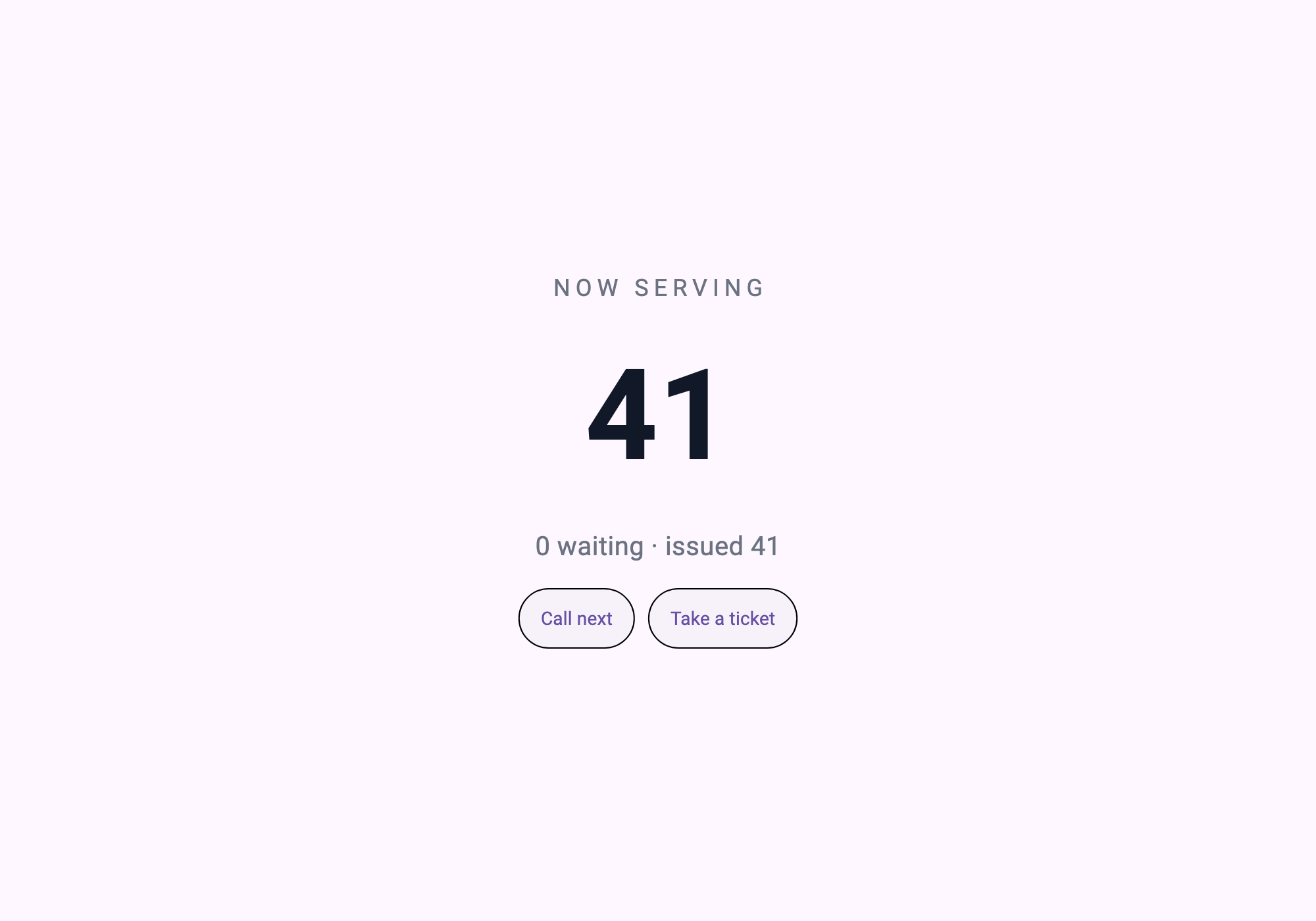
What the check catches
There is one place where this piece most easily becomes a lie: the sample ships the screen itself and the text claims it came from the server. From the capture alone you cannot tell.
So the check reads what the server hands over.
screen = s.read("ui://app")
assert screen["type"] == "page", "the screen must arrive as a resource"
The screen has to arrive as a resource, not as something the sample already had. The line count is checked too — a title that says ten lines against a thirty-line screen fails as well.
LINES=$(grep -c '' ui/screen.json)
[ "$LINES" -le 10 ] || { echo "   ui/screen.json is $LINES lines, the title says ten"; exit 1; }
$ bash verify.sh
[1/3] the screen is short enough to be the claim
ui/screen.json — 9 lines, 901 bytes
[2/3] screen_server (dart analyze)
No issues found!
[3/3] open in AppPlayer, press the buttons, reconnect
first-screen: 10 lines of screen served not compiled, 41 -> 43, refused at the last ticket, reconnect reset it to 41What nine lines bought, and what they did not
Bought — to take the number from 96 to 120, edit one line of the file on the server and reconnect the panel. No build, no install, no review.
Not bought — this screen can't do anything yet. The buttons name tools that don't exist. The number sits at 41.
Making the number move — and whose number it is, the screen's or the counter's — is the next article.
Run it yourself
( cd screen_server && dart pub get )

# In AppPlayer: add a server app — command `dart`, arguments `run bin/server.dart`,
# working directory `screen_server/`.

bash verify.sh
Edit ui/screen.json, run again, and the changed screen comes out as a capture. That is the whole of this piece.
What to take
- A resource handler that reads the file per request — cache it and it stops being install-free
readResource→jsonDecode→initialize, three lines- The screen must arrive as a resource — the one place this claim could go false, closed by the verification
Practice task
In two sentences, explain what changes on the next connection when you edit a screen file, and why no install step is involved.