A Folder of JSON Is the App — There Is No Code in a Bundle
9 minThe previous five pieces were all code. C firmware and Dart servers. A compile ran every time.
This piece has no compile. We are building what the owner of an unmanned store sees, and the source is four JSON files.
unmanned_store.mbd/
  manifest.json            who this is
  ui/app.json              routes
  ui/pages/main.json       one screen
  ui/pages/restock.json    another screen
And in the second half of this piece we actually run the thing where editing that JSON changes the app. No build runs.
The result first
The owner's first screen. Today's takings and stock, and how many things need topping up.
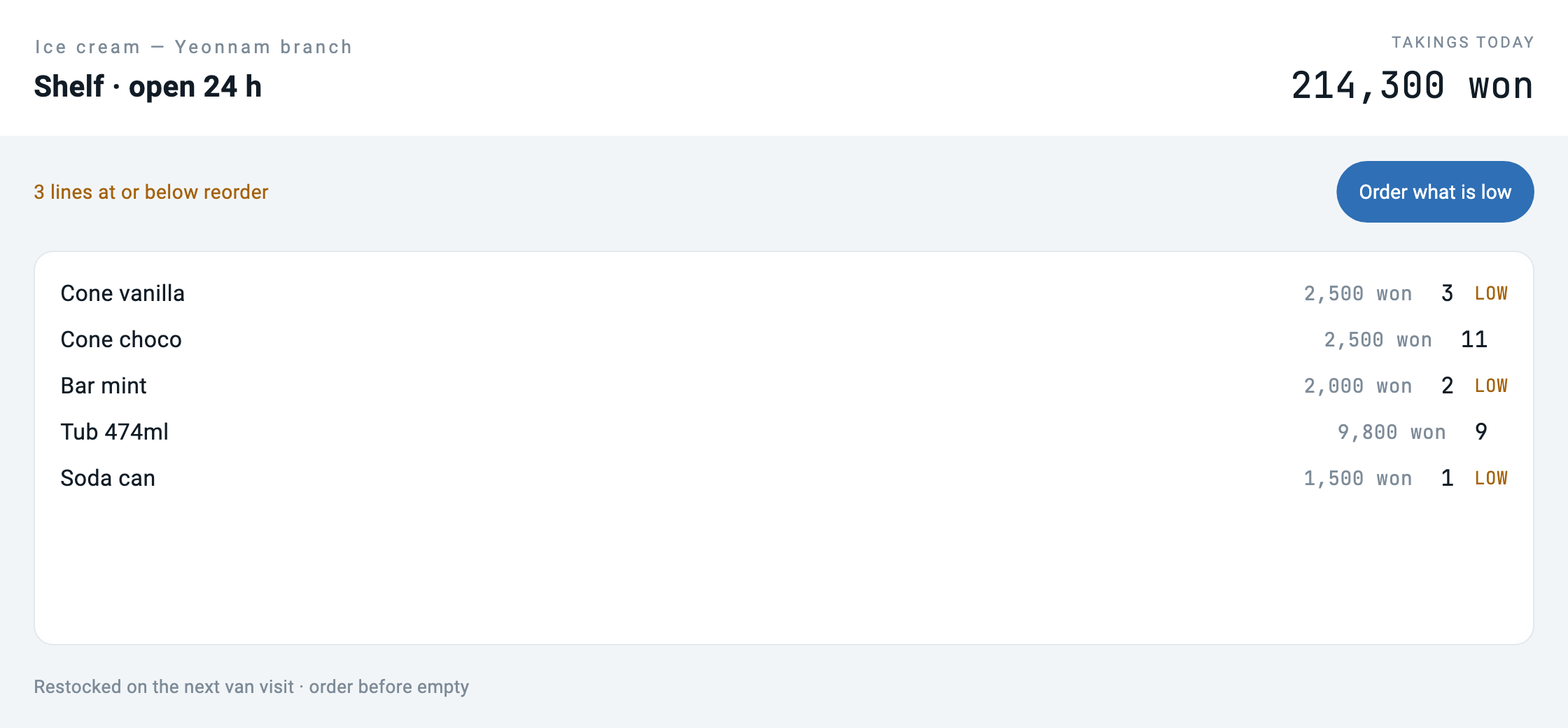
Press "What needs a visit" and it goes to another screen in the same folder.
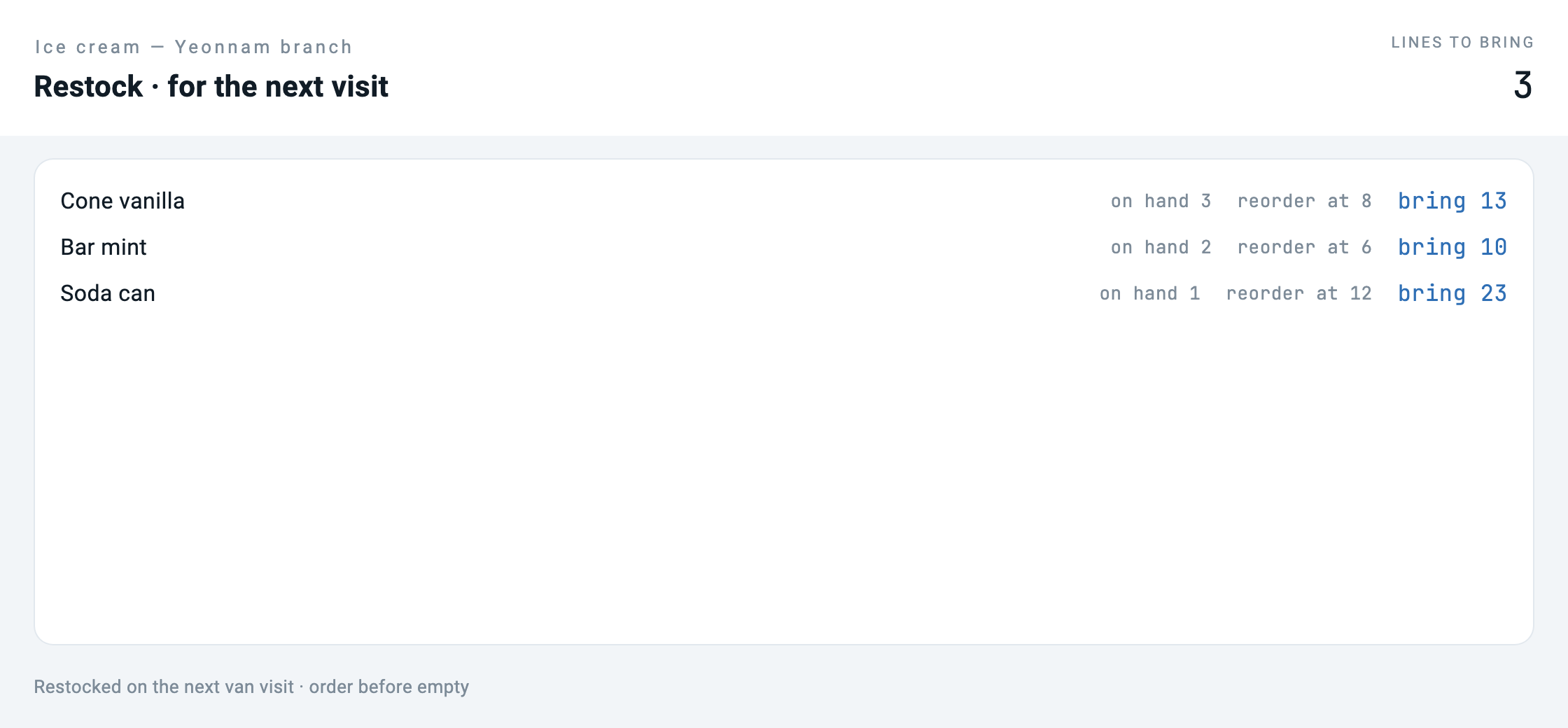
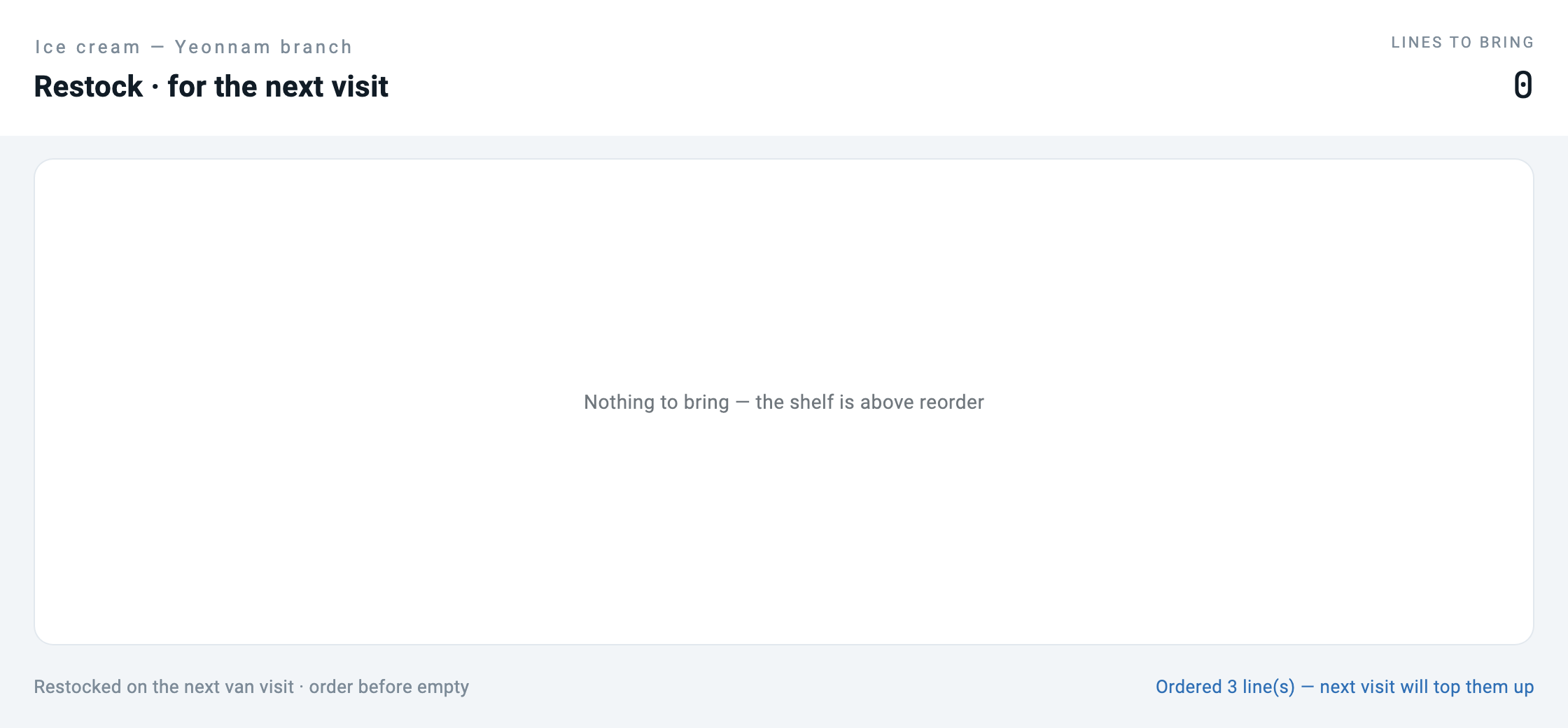
Press "Order the lot" and the list empties.
Now we edit the JSON and run it again. The compiler did not execute.
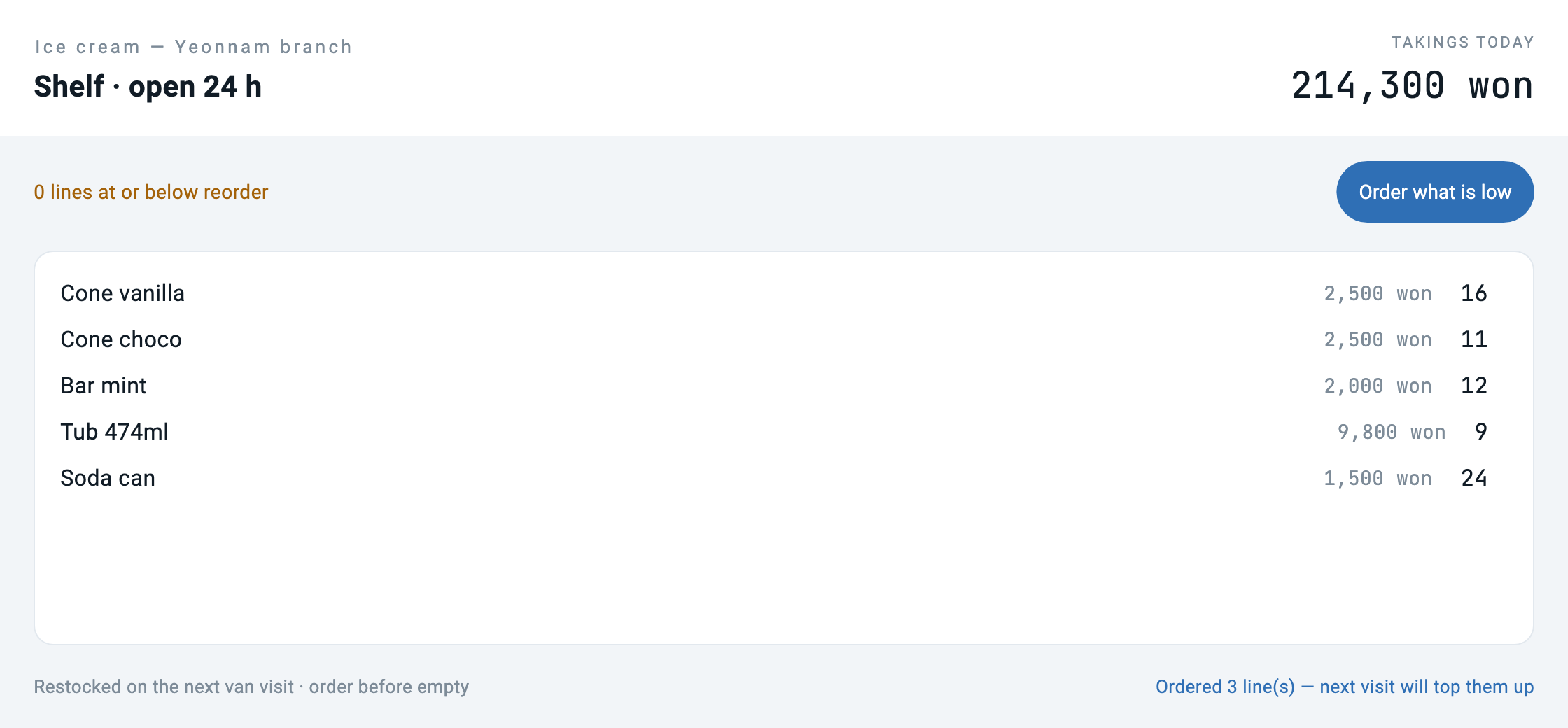
Look at that last screen closely. The labels became a laundrette but the items are still ice cream. This half-changed screen is the most important picture in this piece. We come back to it.
What a bundle is
manifest.json says who this app is. Not code — identity.
{
  "schemaVersion": "1.0.0",
  "manifest": {
    "id": "com.makemind.sample.unmanned_store",
    "name": "Unmanned Store",
    "type": "application",
    "entryPoint": "ui.app",
    "description": "What the owner of an unmanned store sees: stock, takings and what needs a visit. No code, only declarations.",
    "category": "business",
    "tags": ["retail", "unmanned", "sample"]
  }
}
ui/app.json is the map of screens.
{
  "type": "application",
  "title": "Unmanned Store",
  "initialRoute": "/",
  "routes": {
    "/": "ui://pages/main",
    "/restock": "ui://pages/restock"
  }
}
And each page is a screen. What a button does is written here too — not as a function name but as a tool name.
{
  "type": "button",
  "label": "What needs a visit",
  "variant": "elevated",
  "onTap": { "type": "navigation", "action": "push", "route": "/restock" }
},
{
  "type": "button",
  "label": "Refresh",
  "variant": "outlined",
  "onTap": { "type": "tool", "tool": "store.today", "params": {} }
}
The server serves the folder — forty lines
The folder is opened in AppPlayer the way every server app in this series is opened: the store's own server serves it. serve_bundle.dart is the whole of that — it registers ui://app and one ui://pages/<name> per file, and reads the file on every request. It is short because the format does not ask for more: the player already knows how to draw a screen definition, and a bundle is screen definitions with a table of contents.
void registerBundleUi(Server server, String bundleDir) {
  final manifest = _json('$bundleDir/manifest.json')['manifest'];

  void serve(String uri, String name, String description,
      Map<String, dynamic> Function() document) {
    server.addResource(
      uri: uri, name: name, description: description,
      mimeType: 'application/json',
      handler: (requestedUri, params) async => ReadResourceResult(contents: [
        ResourceContentInfo(uri: requestedUri,
            mimeType: 'application/json', text: jsonEncode(document())),
      ]),
    );
  }

  serve('ui://app', manifest['name'], 'The app: routes and theme',
      () => _json('$bundleDir/ui/app.json'));
  for (final f in Directory('$bundleDir/ui/pages').listSync().whereType<File>()) {
    if (!f.path.endsWith('.json')) continue;
    final name = f.uri.pathSegments.last.replaceAll('.json', '');
    serve('ui://pages/$name', name, 'Screen "$name"', () => _json(f.path));
  }
}
The check confirms, before the bundle ships, that there is nothing in the folder to build.
# If there is a build step this article's argument collapses, so start by
# checking there is nothing to build
BUILDISH=$(find unmanned_store.mbd -type f ! -name '*.json' | wc -l | tr -d ' ')
[ "$BUILDISH" -eq 0 ] || { echo "bundle contains non-json files"; exit 1; }
A page fills itself on entry
On the first run the second screen was empty. The server said three lines were short and the capture said "Nothing to bring."
The cause was inside the format. Each page carries its own initialState.
"initialState": { "low": [], "lowCount": 0, "notice": "" }Change route and the new screen starts from its own initial values. Data the previous screen received does not follow. So each page says what to ask on entry, and the runtime merges the answer into the page's state.
"onInit": { "type": "tool", "tool": "store.today", "params": {} }It went into the verification too. The restock screen is photographed only after its list is on it, and ordering has to empty the list, not relabel it.
ap.tap("What needs a visit")
ap.wait_text("bring")                 # photographed only once the list is on it
ap.shot("02_restock.png")
ap.tap("Order the lot")
ap.wait_text("Ordered 3 lines")
ap.expect_no_text("bring 13")         # the ordered line is gone, not just relabelled
Edit the JSON and the app changes
This is the piece's claim. The original is left alone and a copy is edited — three strings in ui/pages/main.json.
after = (before
         .replace("Shelf · open 24 h", "Laundry · open 24 h")
         .replace("TAKINGS TODAY", "COIN BOX TODAY")
         .replace("{{lowCount}} lines at or below reorder",
                  "{{lowCount}} machines need a look"))
Then the app is reopened and drawn again.
edited ui/pages/main.json — 8921 B -> 8919 B, no compiler ran8,921 bytes became 8,919 and the screen changed. In between, the compiler did not run.
But only half of it changed
This is the picture we said we would come back to. The labels became a laundrette; the list is still Cone vanilla, Bar mint, Tub 474ml, and the name is still Ice cream — Elm Street branch, because {{storeName}} is the server's word, not the file's.
This is not a flaw in the demo but the structure showing through. What the bundle holds is the screen; the items are held by the server.
// The bundle in the folder next door has no code. It declares screens and
// says which tool a button calls. The tools live here. That split is the
// argument of this article — the person who edits the screen and the
// person answerable for the stock are not the same person, and should not
// be editing the same file.
The owner does not need a developer to change the wording on a screen. In exchange, no amount of editing the screen will change a stock rule. The boundary between what no-code reaches and what it does not is exactly this line, and that half-laundrette screen shows the line as a single picture.
What the check prints
$ bash verify.sh
   [1/3] bundle is only json
   [2/3] store_server (dart analyze)
No issues found!
   [3/3] open in AppPlayer, walk it, capture
   edited ui/pages/main.json — 8921 B -> 8919 B, no compiler ran
store-bundle: 2 routes walked, reorder cleared the list, json edit took effect with no build
Measurements
| Value | |
|---|---|
| Files in the bundle | 4 (all JSON) |
| Total bundle size | 21 KB (21,551 bytes) |
| Serving helper | 40 lines (serve_bundle.dart) |
| Routes | 2 |
| Builds run | 0 |
No timings. The player's clock is not this piece's subject, and a number that changes every run is not a measurement of the format.
Outside the range
- The load cost of a bundle with dozens of pages. This one has two.
- Installing the
.mbdinto the player directly, without a server. This piece opens the folder through its server, because the pages call that server's tools; the player's install, signing and distribution path was not covered. - Using a client-side channel such as
client.mcpStreamfrom inside a bundle. An existing bundle example (ble_monitor.mbd) uses it; this piece did not attach it.
The range of this sample
What this piece ran is the bundle format — served by its own server and drawn by AppPlayer — not the player's installation pipeline. We will not blur that distinction.
Run it yourself
( cd store_server && dart pub get )
bash verify.sh        # bundle check + analyze + AppPlayer: two routes, the order, the edit
Or open it by hand: in AppPlayer add a server app — command dart, arguments run bin/server.dart, working directory store_server/. And the bundle itself needs no tool at all; a text editor is enough.
cat unmanned_store.mbd/ui/app.json
cat unmanned_store.mbd/ui/pages/main.json
What to take away
- The bundle skeleton — the four files of
unmanned_store.mbd/. Rename them and it is the starting point for your next app - The 40-line serving helper —
serve_bundle.dart. Copy it next to any server and the folder beside it is the app - The bundle check — the zero-non-JSON check and the route resolution check in
verify.sh
Where to edit to make it yours
To change wording or layout — ui/pages/*.json. No developer needed and no build.
To add a screen — one file in ui/pages/, one line in routes in ui/app.json. The button that goes there is {"type":"navigation","action":"push","route":"/newname"}.
To change the data — the server, not the bundle. This is the boundary. However much you edit the bundle, the items will not change (§ But only half of it changed).
So what this format sells
There is a sentence in a proposal — "domain experts fuse domain-specific app bundles by clicking, with no coding."
This piece pays back the exact size of that sentence. What works without coding is the screen. The screen is JSON, JSON is something a person can edit, and edits take effect with no build. That much is true.
And to be honest, what does not work has to be written too. What the items are, what the reorder point is, how an order goes out — those are outside the bundle. That is the server's job and somebody has to write it. The half-laundrette screen shows the line — and rather than promising to erase that line, it is better to show where it is.
Practice task
In two sentences, explain what changes on the next connection when you edit a screen file, and why no install step is involved.