10行で最初の画面を出す
5 分待合室の番号板を作る。大きな数字ひとつ、待ち人数の一行、ボタン二つ。
これを作るのに普通は何が要るか。プロジェクトを作り、ウィジェットツリーを組み、ビルドし、パネルにインストールする。数字を大きくしたければ、その四段をもう一周する。
ここでは 画面がサーバーにあるファイル一枚だ。 接続すればそのファイルが来る。
画面
これで全部だ。
{ "type": "page", "title": "Front Desk",
  "content": { "type": "center",
    "child": { "type": "linear", "direction": "vertical", "spacing": 16, "alignment": "center", "children": [
      { "type": "text", "text": "NOW SERVING", "style": { "fontSize": 18, "letterSpacing": 4, "color": "#6b7280" } },
      { "type": "text", "text": "{{now}}", "style": { "fontSize": 96, "fontWeight": "bold", "color": "#111827" } },
      { "type": "text", "text": "{{waiting}} waiting · issued {{issued}}", "style": { "fontSize": 20, "color": "#6b7280" } },
      { "type": "linear", "direction": "horizontal", "spacing": 12, "children": [
        { "type": "button", "label": "Call next", "onTap": { "type": "tool", "tool": "queue.next" } },
        { "type": "button", "label": "Take a ticket", "onTap": { "type": "tool", "tool": "queue.take" } } ] } ] } } }
題は十行と付けたが、実際には 九行、901 バイトで終わった。
{{now}} のところに番号が入る。ボタンの onTap は道具の名を呼ぶ — この記事ではまだ押しても何も起きない。それは次の記事だ。
その九行はサーバーにある
サーバー側のコードはこれだけだ。
server.addResource(
  uri: 'ui://app',
  name: 'Front Desk screen',
  description: 'The screen definition, served as a file',
  mimeType: 'application/json',
  handler: (uri, params) async => ReadResourceResult(contents: [
    ResourceContentInfo(
      uri: 'ui://app',
      mimeType: 'application/json',
      text: File(_screenPath).readAsStringSync(),
    )
  ]),
);
毎回ファイルを読み直している。 起動時に一度読んでメモリに持てば速いが、そうすると画面を直すたびにサーバーを再起動しなければならず、その瞬間このサンプルの主張 — ファイルを直せば別のアプリになる — が嘘になる。
/// Read fresh on every request, deliberately. A screen cached at boot is a
/// screen you have to restart the server to change, and then the thing this
/// sample claims — edit the file, get a new app — stops being true.
受け取って描く
クライアント側は三行だ。
final read = await client.readResource('ui://app');
final screen = jsonDecode(read.contents.first.text!) as Map<String, dynamic>;
await rt.initialize(screen);
rt がランタイムだ。JSON を入れれば画面になる。
the server offers: ui://app
ui://app — 901 B, 9 lines, type "page", title "Front Desk"
nothing about this screen is on disk in the player; it arrived just now
opened at 41, 0 waiting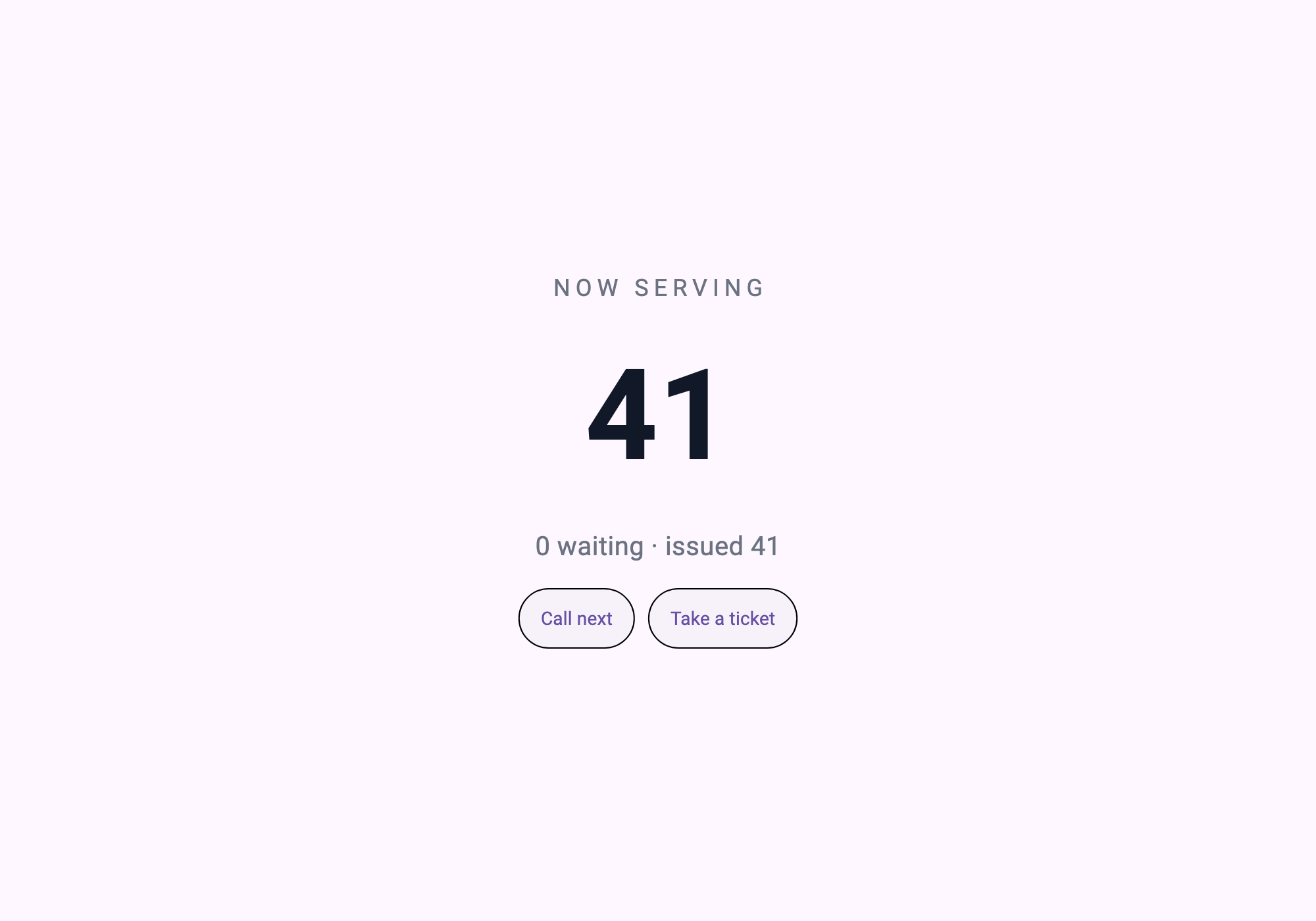
検証が捕まえるもの
この記事がいちばん簡単に嘘になる場所がある。サンプルが画面をすでに持っていて「サーバーから来た」と書くこと。 キャプチャだけでは見分けがつかない。
だから検証はサーバーが渡すものを見る。
screen = s.read("ui://app")
assert screen["type"] == "page", "the screen must arrive as a resource"
画面はリソースとして届かねばならず、サンプルがすでに持っていたものなら失敗する。行数も検査する — 題が十行なのに画面が三十行になっていれば、それも失敗だ。
LINES=$(grep -c '' ui/screen.json)
[ "$LINES" -le 10 ] || { echo "   ui/screen.json is $LINES lines, the title says ten"; exit 1; }
$ bash verify.sh
[1/3] the screen is short enough to be the claim
ui/screen.json — 9 lines, 901 bytes
[2/3] screen_server (dart analyze)
No issues found!
[3/3] open in AppPlayer, press the buttons, reconnect
first-screen: 10 lines of screen served not compiled, 41 -> 43, refused at the last ticket, reconnect reset it to 41九行が買ったものと、買わなかったもの
買ったもの — 画面の文字を 96 から 120 に変えたければ、サーバーのファイルを一行直してパネルを繋ぎ直す。ビルド無し、インストール無し、審査無し。
買わなかったもの — この画面はまだ何もできない。ボタンが道具の名を呼ぶが、その道具が無い。番号が 41 から動かない。
数字を動かすこと、そしてその数字が 誰のものか — 画面のものか、カウンターのものか — は次の記事だ。
自分で動かす
( cd screen_server && dart pub get )

# In AppPlayer: add a server app — command `dart`, arguments `run bin/server.dart`,
# working directory `screen_server/`.

bash verify.sh
ui/screen.json を直して回し直せば、変わった画面がキャプチャで出てくる。それがこの記事の全部だ。
持ち帰るもの
- 毎リクエストでファイルを読むリソースハンドラ — キャッシュした瞬間、無インストールでなくなる
readResource→jsonDecode→initializeの三行- 画面はリソースとして届く — この主張が嘘になりうる唯一の場所を検証が塞ぐ
練習課題
画面ファイルを直すと次の接続で何が変わるのか、なぜインストールの手順がないのかを二文で説明してください。