十行代码,推出第一个画面
5 分钟目标做一块候诊叫号屏。画面定义只有九行,而这九行不在客户端里。服务端把它当成一个文件拿着,接进来就递过去。所谓「不用构建、不用安装」,说的就是这件事。
一块候诊叫号屏。一个大数字、一行等待人数、两个按钮。
平常做这个要什么?建工程、写控件树、构建、装到面板上。想把数字调大?这四步再走一遍。
而这里,画面就是服务端上的一个文件。 一连上,文件就来了。
画面
全部就这些。
{ "type": "page", "title": "Front Desk",
  "content": { "type": "center",
    "child": { "type": "linear", "direction": "vertical", "spacing": 16, "alignment": "center", "children": [
      { "type": "text", "text": "NOW SERVING", "style": { "fontSize": 18, "letterSpacing": 4, "color": "#6b7280" } },
      { "type": "text", "text": "{{now}}", "style": { "fontSize": 96, "fontWeight": "bold", "color": "#111827" } },
      { "type": "text", "text": "{{waiting}} waiting · issued {{issued}}", "style": { "fontSize": 20, "color": "#6b7280" } },
      { "type": "linear", "direction": "horizontal", "spacing": 12, "children": [
        { "type": "button", "label": "Call next", "onTap": { "type": "tool", "tool": "queue.next" } },
        { "type": "button", "label": "Take a ticket", "onTap": { "type": "tool", "tool": "queue.take" } } ] } ] } } }
标题写的是十行,实际收在了 九行、901 字节。
数字落在 {{now}} 的位置。按钮的 onTap 叫的是工具名——这一篇里按下去还什么都不会发生。那是下一篇的事。
那九行在服务端
服务端的代码就这么多。
server.addResource(
  uri: 'ui://app',
  name: 'Front Desk screen',
  description: 'The screen definition, served as a file',
  mimeType: 'application/json',
  handler: (uri, params) async => ReadResourceResult(contents: [
    ResourceContentInfo(
      uri: 'ui://app',
      mimeType: 'application/json',
      text: File(_screenPath).readAsStringSync(),
    )
  ]),
);
每次请求都重新读文件。 启动时读一次放内存里更快,但那样一改画面就得重启服务端,而在那一刻,这个样例主张的事——改了文件就是另一个应用——就成了假的。
/// Read fresh on every request, deliberately. A screen cached at boot is a
/// screen you have to restart the server to change, and then the thing this
/// sample claims — edit the file, get a new app — stops being true.
接过来,画出去
客户端这边是三行。
final read = await client.readResource('ui://app');
final screen = jsonDecode(read.contents.first.text!) as Map<String, dynamic>;
await rt.initialize(screen);
rt 就是运行时。放进 JSON,出来一块屏。
the server offers: ui://app
ui://app — 901 B, 9 lines, type "page", title "Front Desk"
nothing about this screen is on disk in the player; it arrived just now
opened at 41, 0 waiting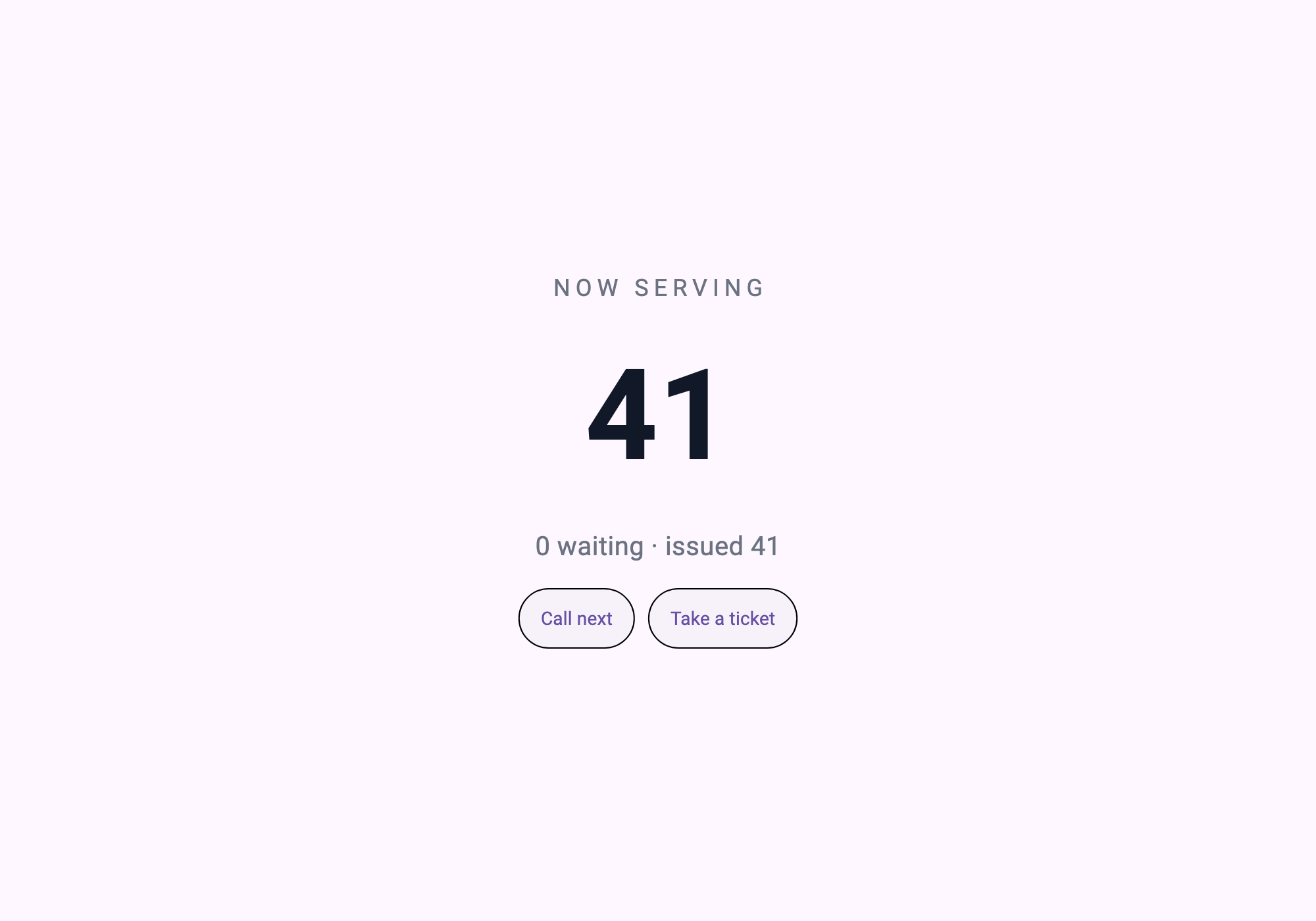
校验拦住的东西
这一篇最容易变成谎话的地方只有一个:样例本来就带着画面,文里却写「是服务端来的」。 光看截图分不出来。
所以校验去看服务端交出来的东西。
screen = s.read("ui://app")
assert screen["type"] == "page", "the screen must arrive as a resource"
画面必须以资源的形式到达;若是样例本来就有的,就失败。行数也查——标题说十行而画面写了三十行,同样失败。
LINES=$(grep -c '' ui/screen.json)
[ "$LINES" -le 10 ] || { echo "   ui/screen.json is $LINES lines, the title says ten"; exit 1; }
$ bash verify.sh
[1/3] the screen is short enough to be the claim
ui/screen.json — 9 lines, 901 bytes
[2/3] screen_server (dart analyze)
No issues found!
[3/3] open in AppPlayer, press the buttons, reconnect
first-screen: 10 lines of screen served not compiled, 41 -> 43, refused at the last ticket, reconnect reset it to 41九行买到的与没买到的
买到的 — 想把数字从 96 改成 120,就改服务端文件的一行,再让面板重连。不构建、不安装、不过审。
没买到的 — 这块屏还什么都干不了。按钮叫的工具并不存在。数字停在 41。
让数字动起来,以及那个数字 是谁的 ——是屏幕的还是柜台的——是下一篇。
自己跑一遍
( cd screen_server && dart pub get )

# In AppPlayer: add a server app — command `dart`, arguments `run bin/server.dart`,
# working directory `screen_server/`.

bash verify.sh
改一下 ui/screen.json 再跑,变了的画面就会以截图出来。这一篇全部就是这件事。
可以带走的
- 每次请求都读文件的资源处理器 — 一缓存就不再是免安装
readResource→jsonDecode→initialize三行- 画面必须以资源到达 — 把这个主张唯一可能作假的口子堵上
练习任务
用两句话说明:修改画面文件后,下一次连接时会发生什么变化,以及为什么不需要安装步骤。